INTERFACE SHOWCASE
Visual & Intuitive UI
Real screenshot of the plugin user interface running natively inside 3ds Max.
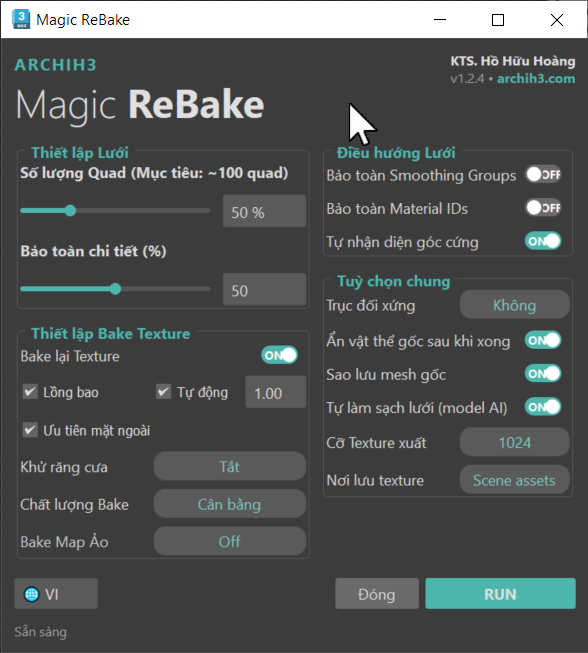
Automatically reconstruct clean, optimized Quad meshes in 1-Click from messy triangulated geometry, boolean errors, or 3D scans. Concurrently unwraps UVs and bakes original materials to the new mesh with blazing speed.
Real screenshot of the plugin user interface running natively inside 3ds Max.
Fix messy triangles, heavy CAD structures, or scan meshes. Regenerate clean topology and perfectly preserve original materials on your new lightweight mesh.
Smart reconstruction algorithm converts messy triangles, complex boolean geometry, or heavy 3D scans into clean, regular, and lightweight Quad-based models ready for rendering.
Integrated smart texture transfer processor. Automatically maps and bakes all material channels (Diffuse, Normal, Roughness, AO) from the source model onto the optimized target accurately and quickly.
Automatically computes and unwraps UV coordinates for the new Quad mesh directly inside 3ds Max, ensuring textures fit perfectly without stretching or scaling distortions.
Smart filtering detects and corrects UV texture seams along boundary splits. Completely eliminates unwanted staircasing, artifacts, or spikes at the edges of your materials.
Completely automated workflow. From temp mesh exporting, topology calculation, UV mapping, texture baking, to assigning the final material. Just enter your target count and press one button.
Runs 100% locally on your computer with zero cloud uploads, ensuring absolute privacy for your assets. Lifetime license tied to your HWID with free automatic updates.
Convert heavy and messy models into game-ready, lightweight assets.
Select the target model in your scene, and adjust the slider to set your desired target Quad polygon count.
Click the Remesh button. The engine computes the geometry layout and reconstructs clean Quad topology instantly.
The plugin automatically unwraps UVs, projects textures, and assigns a ready-to-render material back to the scene.
Get lifetime access to the premier topology optimization plugin for 3ds Max at an unmatched price. Tied to HWID.
Sale price requires liking the Magic Merger post in Group Phần Mềm Kiến Trúc, October 16–22, 2026. Message on Facebook for confirmation; details below.
Core details helping you understand how Magic ReBake operates under the hood.
When you click Remesh, the plugin invokes a background geometry processor to build the Quad mesh. Then, a vectorized raycasting algorithm runs on your CPU to calculate and project colors and maps from the original mesh to the new UV layout.
Before baking, the plugin automatically unwraps mapping coordinates for the new mesh. If the Quad layout splits along polygon diagonals creating bad seams, a Boundary Healer aligns the split vertices to smooth out the edges, removing striping or pixel artifacts.
Your perpetual license is linked to your hardware ID (HWID). All retopology and baking features operate offline for maximum security. When a patch or new version is available, the plugin checks and pulls updates automatically (OTA) in seconds.