TUTORIAL
How to use Magic Material
Detailed video tutorial on generating and assigning PBR materials automatically in 3ds Max.
Specialized plugin to automatically generate a complete set of PBR maps (Normal, Displacement, Roughness, AO) and set up material networks in 3ds Max. Deeply integrated with V-Ray and Corona to eliminate tedious manual workflows.
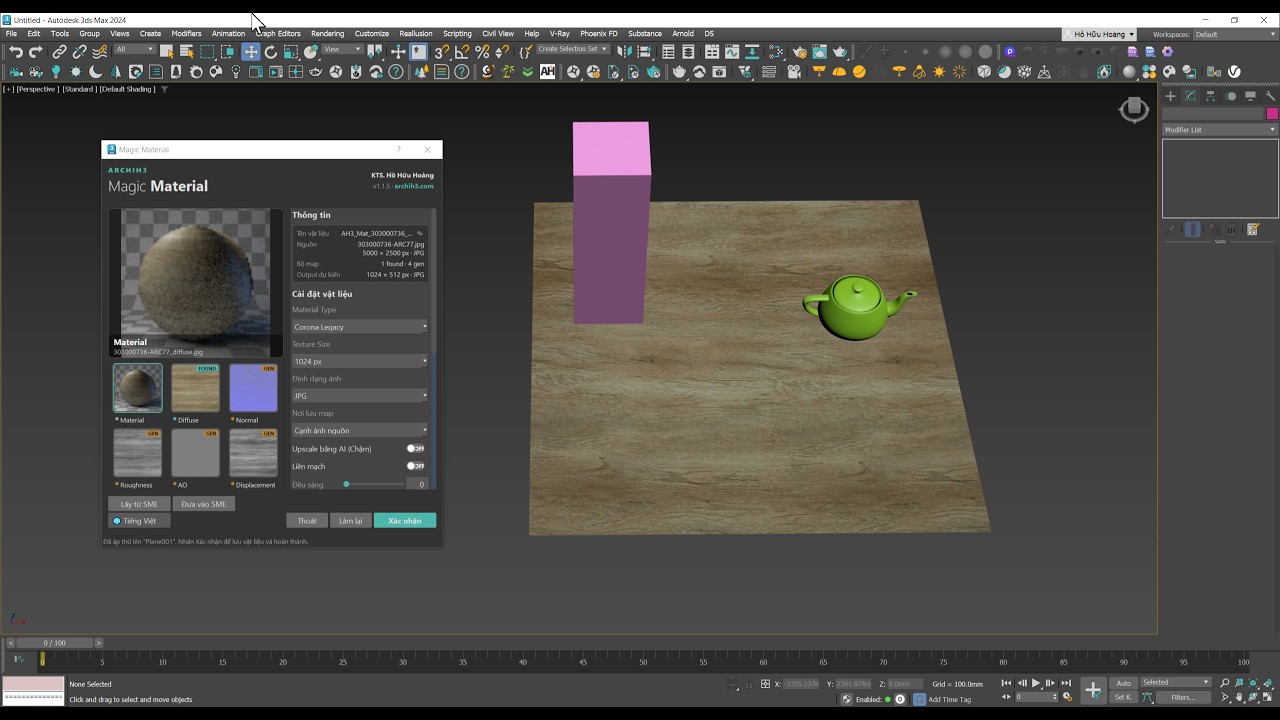
Real screenshot of the plugin user interface running natively inside 3ds Max.
Drag your diffuse texture or a compressed zip/rar archive directly into the plugin window.
Toggle Seamless Gaussian, Auto UVW, select the rendering target, and adjust your tiling scale.
Click Generate & Apply. The material is instantly built and assigned to the selected 3D object.
Turn any single texture image into a complete PBR material set with reflections, roughness, and depth maps in seconds.
Drag and drop a single diffuse image. The system automatically analyzes contrast and chromatic ranges to generate 4 high-quality maps: Normal, Displacement, Roughness, and AO.
Unmatched processing speed running natively on your hardware without any internet or cloud servers. Keeps your project files completely private, zero cloud uploads.
Auto-detects naming conventions of major texture vendors (CGAxis, Poliigon, Megascans, ambientCG, Poly Haven). Only generates missing maps to save processing time.
Remove visible pattern seam lines using smart blending filters. Helps you create organic, highly realistic tileable materials with ease.
Automatically detects the active renderer to set up and connect physical material node networks accurately, assigning them directly to objects in viewport.
Integrated quick UVW mapping and controls for tiling and rotation directly in the plugin window, bypassing the need to open the 3ds Max Material Editor.
Special introductory pricing to own a perpetual license of Magic Material.
Sale price requires liking the Magic Merger post in Group Phần Mềm Kiến Trúc, October 16–22, 2026. Message on Facebook for confirmation; details below.
Detailed video tutorial on generating and assigning PBR materials automatically in 3ds Max.
Core technical aspects about how Magic Material functions under the hood.
Magic Material is fully compatible with 3ds Max 2023 up to 2027+. The plugin auto-detects and sets up material networks for both Corona Renderer (CoronaPhysicalMtl) and V-Ray (VRayMtl) based on your active renderer.
You can drag and drop single image formats (JPG, PNG, TGA), entire texture folders, or compressed archives (.zip, .rar, .7z) directly. The plugin automatically parses the files, reads existing maps, and extracts them.
Not at all. Magic Material works with a strict safety-first approach: original mapping coordinates (UVW) and mesh geometry are 100% preserved. All material application actions support standard Ctrl+Z undo keys to keep your scene completely safe.